Shanashma - A Claude Code Plugin Marketplace for Azure DevOps
This blog post is fully written by hand, in my own words. I hate that I have to say this but especially given the recent trends with LLMization of articles, I want to be explicit about it.

I use Azure DevOps every day at my company. My team has a peculiar problem of work items and repos being in two different projects under the same organization. This makes sense when you think about the potential clientele being different for these two (the work items is more customer and PM friendly and repos being developer friendly) but it is a pain to work with when you are switching context 20-30 times a day.
When Claude Code came along, I figured this would get easier. I tried the ADO MCP server. Gave it my organization name and pointed it at the right projects. Sometimes it worked but most of the times it created work items in my repo oriented projects and I had to clean up the LLM's mess.
I tried having a hard-coded config and it worked slightly better but the moment I had it interacting with work items in my existing coding session, it kept facing the same problem. Also, reminding LLM again and again that please use this config seemed like a waste of time and tokens.
The MCP server treated every interaction as a fresh start. No memory of what I told it yesterday. No understanding of how my setup was different from the default.
What I Actually Wanted
I didn't need a general-purpose ADO agent but rather a customizable one where my config could look like:
- Work items go to Project A
- Pull requests go to Project B
- Area path and iteration path should be detected from my recent work
- Don't ask me for the same information twice
I would set my config only once and never be bothered again about LLM finding the right project. Unfortunately, the MCP server isn't designed for this level of customization. I needed something opinionated about my workflow.
Another disclaimer! The workflows I am sharing here are based on my own experimentation and are bound to be highly opinionated based on my preferences and tuned to my liking.
Why not a plugin Instead of an MCP Server
Claude Code plugins have persistent configuration and customizable workflows and most importantly I can share the solution with my teams easily.
With a plugin, I could:
- Save the organization, work item project, and PR project once to a config file
- Detect area paths and iteration paths dynamically from my recent work items instead of maintaining a static mapping
- Build slash commands that feel natural (inspired by the compound-engineering plugin) —
/adoflow:workitems create a buginstead of wrestling with API parameters - Share the whole thing with teammates who have the same two-project setup
So I built ado-flow as three slash commands (for now):
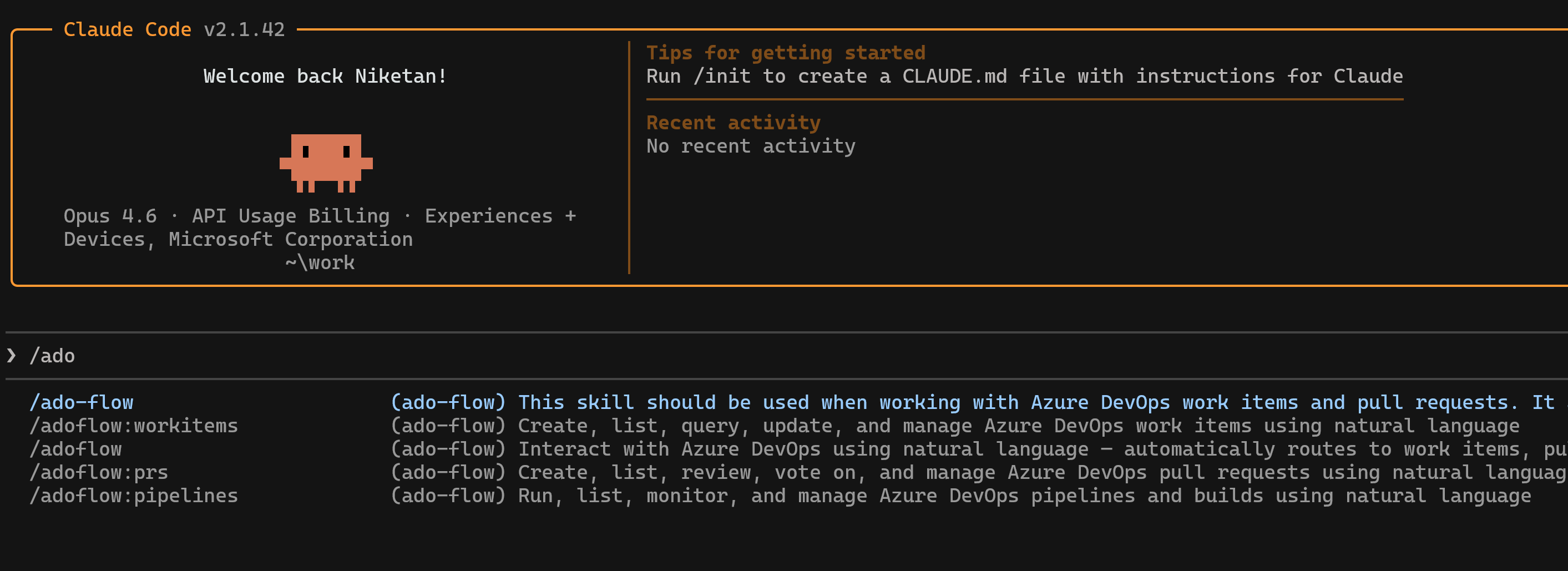
/adoflow:workitems— create, list, query, and update work items/adoflow:prs— create, list, review, vote on, and manage pull requests/adoflow:pipelines— run, list, and monitor pipelines and builds
The first time you run any of these, it walks you through setup and saves it to ~/.config/ado-flow/config.json.
For fields which change every sprint (iteration path for instance), I skipped hardcoding entirely. Instead, the plugin fetches your last 10 work items and detects the most common area path and iteration path from those. It confirms with you before using them. If your team moves to a new sprint, the plugin picks it up automatically from your recent work.
Shanashma
I packaged ado-flow into a plugin marketplace I'm calling Shanashma — Sanskrit for whetstone. It's stone used in my village to sharpen the metalic tools (knives/axe) etc. The philosophy here is that this marketplace will have tools to sharpen your existing services (like ADO).
Right now it's just ado-flow and any team tool that requires persistent configuration and natural language workflows is a good candidate.
The install is two commands:
/plugin marketplace add https://github.com/niketansrane/shanashma
/plugin install ado-flow@shanashma
Here's what it looks like once installed:
If your team uses Azure DevOps with a similar multi-project setup, give Shanashma a try. And if you've built Claude Code plugins for other tools, I'd love to hear about the patterns that worked for you.